Assigning output groups to audio zones

Via the “EVAC” button, which refers to the output group selected in the specific programming section, you access to another section where you can assign groups of outputs to the Audio zones in configuration:
|
|
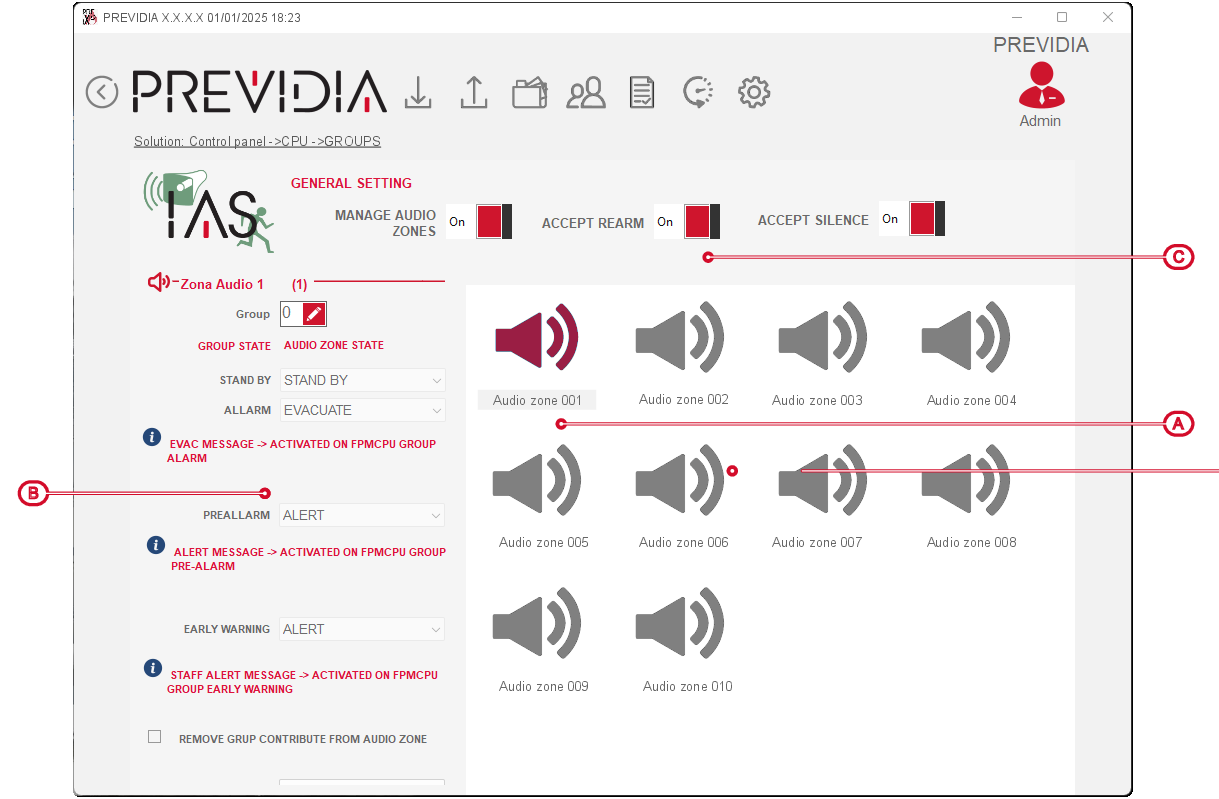

After selecting the zone of interest, the assignment achieved via the specific “Groups” button, in the section on the left [B]. Here you can visualize the statuses of the indicated groups in correlation to the statuses of the selected zone.
|
Outputs group status |
> |
Audio zone status |
|---|---|---|
| stand-by |
> |
stand-by |
| alarm |
> |
evacuation |
| pre-alarm |
> |
alert |
| early-warning |
> |
staff alert |
It is also possible to delay the activation of the audio zone with respect to that of the output group using the “Remove group contribution from audio zone” option. If the option is activated, in the field below it is possible to indicate the delay time between the two activations.
The top section [C] Previdia/STUDIO allows you to set up the functions of the voice emergency system that can be reproduced on the fire system:
-
Manage audio zones – if this option is deactivated, the entire section currently being programmed will be ignored by the control panel.
-
Rearm fire control panel from – if this option is activated, rearming from a FPAMIAS panel also effects the FPMCPU panel, and therefore the entire control panel.
-
Mute control panel – if this option is activated, muting from a FPAMIAS panel also effects the FPMCPU panel, and therefore the entire control panel.
